


HCPhom
G90 7-Inch Handheld Game Console
G90 7-Inch Handheld Game Console
Features
Features
7-Inch IPS Display
Linux-Based Gaming System
30+ Emulator Format Support
4000mAh Rechargeable Battery
HDMI Output and Dual Controllers
Couldn't load pickup availability
- Secure Payment
- Return Support
- Free Shipping
Product Overview
The G90 7-Inch Handheld Game Console combines a large IPS display, portable design, Linux-based gaming system, and flexible retro-style game support in one device.
Its 7-inch fully laminated screen offers a 1024 × 600 resolution for clear everyday gaming, while the quad-core ARM Cortex-A7 processor, dual 3D joysticks, stereo speaker, and built-in 4000mAh battery support a comfortable handheld experience at home or while traveling.
The G90 also supports HDMI output and compatible external controllers, allowing it to switch from portable play to larger-screen two-player entertainment.
Why You’ll Like It
- Large 7-inch fully laminated IPS screen
- Clear 1024 × 600 display resolution
- Linux-based retro gaming system
- Quad-core ARM Cortex-A7 processor
- DDR3 1GB RAM and 4GB eMMC system storage
- Dual 3D joysticks for flexible game control
- Supports 30+ emulator formats depending on compatibility
- HDMI output for compatible TVs and monitors
- External controller support for two-player gaming
- Built-in high-quality stereo speaker
- 4000mAh rechargeable battery
- Type-C charging
- Supports 29 system languages depending on version
- TF card expansion support
- Available in red-blue, black, and white
Handheld and Big-Screen Play
Use the G90 as a portable handheld console or connect it to a compatible display through HDMI output. External controller support also makes it suitable for shared home entertainment and two-player gaming.
Version Notice
Storage capacity, preloaded content, supported emulator formats, accessories, colors, menu language, and package contents may vary depending on the selected version and supplier batch.
Some games may not run smoothly or may not be fully compatible because of emulator core, game file, system, or hardware limitations. Please check the selected option and product images carefully before ordering.
Share


More information
Model
Product Name: G90 7-Inch Handheld Game Console
Model: G90
Category: Handheld Game Console
System: Linux-based retro gaming system
Standard Storage: 64G TF card
Color Options: Red / Blue, Black, White
Use Scenario: Portable gaming, home entertainment, HDMI gaming, two-player gaming, travel, and gifting
Parameters
Material: ABS
Display: 7-inch fully laminated IPS screen
Resolution: 1024 × 600
CPU: Quad-core ARM Cortex-A7
RAM: DDR3 1GB
System Storage: eMMC 4GB
Operating System: Linux-based system
Controls: Direction keys, function keys, dual 3D joysticks, shoulder buttons
Audio: Built-in stereo speaker
Video Output: HDMI high-definition output
Controller Support: Compatible external controllers for two-player gaming
Battery Capacity: 4000mAh
Charging Port: Type-C
Language Support: 29 languages depending on system version
Standard Storage: 64G TF card
TF Card Expansion: Up to 256GB depending on version and system configuration
Game Format Support: Arcade, FBNeo, MAME, CPS1, CPS2, CPS3, Atari series, PC Engine, NES, SFC, SNES, GB, GBC, GBA, MD, Genesis, Game Gear, NGPC, PS1, PSP-format and other selected retro formats depending on compatibility
Emulator Support: 30+ formats depending on system version
User Guide
Power and Charging: Connect the included Type-C charging cable to a suitable power adapter. Fully charge the console before first use.
Game Selection: Use the directional keys or joystick to browse the system menu, then press the confirm button to open a game.
Game Exit: Use the supported exit shortcut or system menu. The exact key combination may vary depending on the emulator.
Save Progress: Save and load functions depend on the selected game and emulator core.
HDMI Output: Connect the console to a compatible TV or monitor using a suitable HDMI cable. Switch the display input source if necessary.
External Controllers: Pair or connect compatible controllers through the supported interface. Controller compatibility may vary by system version and game format.
TF Card Use: Turn off the console before removing or inserting the TF card. Use only compatible file formats and place game files in the correct folders.
Compatibility Note: Some games may not run smoothly or may not be supported due to emulator, game file, system, or hardware limitations.
Packing List
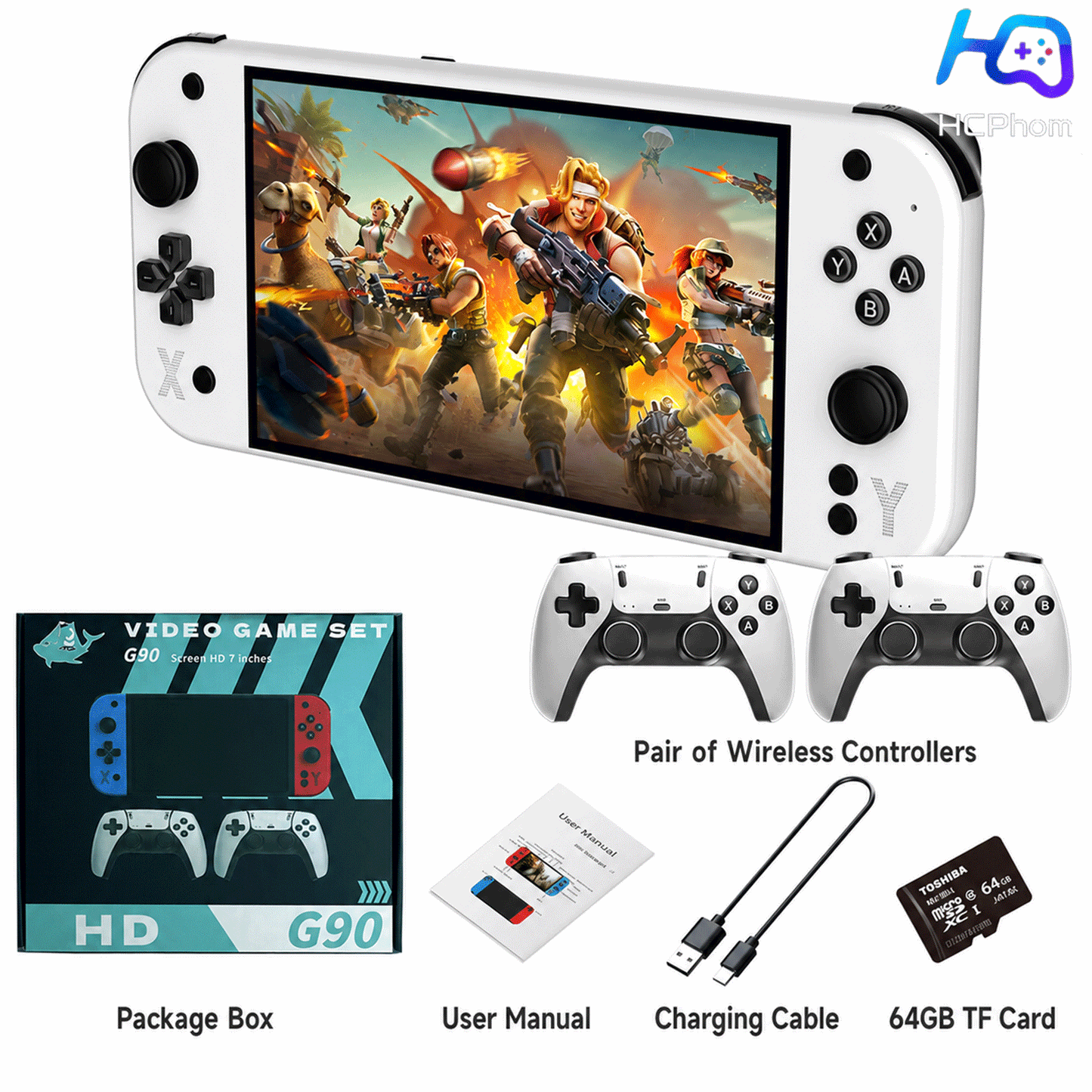
G90 handheld game console × 1
64G TF card depending on selected version × 1
Type-C charging cable × 1
Screen protector × 1
Instruction manual × 1
Retail package × 1
FAQ
What screen does the G90 use?
The G90 uses a 7-inch fully laminated IPS screen with a resolution of 1024 × 600.
What system does it use?
It uses a Linux-based retro gaming system.
Does it support HDMI output?
Yes. The G90 supports HDMI output to compatible TVs and monitors.
Can two people play together?
The console supports compatible external controllers for two-player gaming. Controller support may vary depending on the game, emulator, and selected package.
How much storage is included?
The standard version includes a 64G TF card depending on the selected option.
Does it support TF card expansion?
Yes. It may support expansion up to 256GB depending on product version and system configuration.
Does it support 30+ emulator formats?
Yes. The system supports 30+ emulator formats depending on software version, emulator core, and game compatibility.
Are all games guaranteed to run?
No. Compatibility and performance vary depending on the emulator, game file, system configuration, and hardware requirements.
Is an HDMI cable included?
An HDMI cable is not guaranteed to be included unless it is clearly shown in the selected package.
What colors are available?
Available colors include red-blue, black, and white, depending on inventory.
What should I do if I need help?
Please contact HCPhom support with your order number, selected color, system version, and a clear description of the issue.